
About iHandify RestAPI
I. Overview
iHandify RestAPI provides three major AI services:
1. Handwriting Text Recognition (iHTR)
- Converts handwritten content into machine-readable text.
- Supports both digital ink and image input.
- Supported languages:
- Japanese
- English
- Vietnamese
2. Handwriting Formula Recognition (iHFR)
- Recognizes handwritten scientific formulas into LaTeX.
- Supports both digital ink and image input.
- Supported domains:
- Mathematics
- Chemistry
- Physics
3. Calligraphy Assistant System (iCAS)
- Evaluates handwritten characters written with digital ink.
- Focuses on:
- Writing order
- Writing correctness
- Aesthetic quality and balance
II. Base URL
https://api.ihandify.com/v1
III. Authentication
All requests must be authenticated using a valid Scoped Public API key.
An API key grants access to a set of resources based on your subscribed plan. To obtain your API key, you need to subscribe to one of our available plans. Your Scoped Public API key can be generated using your Secret API key, which can be found in your subscription settings.
We recommend using the Scoped Public API key for frontend requests, while securely handling the generation of Scoped Public API keys in the backend of your system using the Secret API key.
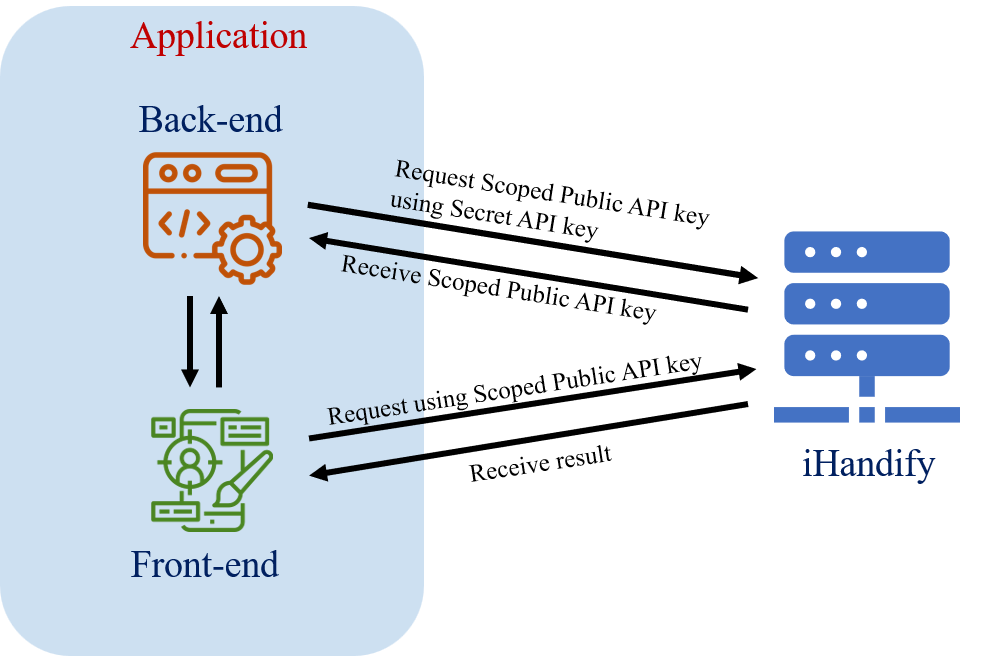
Requests that do not include a valid API key, use a deleted or expired key, or attempt to access resources outside the scope of your subscription plan will return a Forbidden error.
Scoped Public API Key generation
To generate a Scoped Public API key, send a POST request to the following endpoint with your Secret API key included in the request headers as follows:
 curl -X POST https://api.ihandify.com/v1/plan/auth/generate-scoped-public-key \
 	-H "x-api-key: {SECRET_API_KEY}" \
 	-F "expireInSeconds=30"		# Optional: specify the desired expiration time for the Scoped Public API key in seconds (default is 300 seconds or 5 minutes, minimum is 1 second, maximum is 1800 seconds or 30 minutes)
Response will include the generated Scoped Public API key along with its expiration time:
 HTTP/1.1 200 OK
 Content-Type: application/json; charset=utf-8
 {
 	"data":{
 		"scopedPublicKey": "spk_cde88bc3267e3378677404121856330a4feb345c7712e04587cbaa2d9769583a",
 		"expiresIn": 30,
 		"expiresAt": "2026-04-01T02:23:04.5575279Z"
 	}
 }
API Key Usage
When making requests to the iHandify RestAPI, include your Scoped Public API key in the request headers as follows:
x-api-key: {SCOPED_PUBLIC_API_KEY}
IV. Data Types
1. Digital Ink Format
Digital ink represents pen stroke data captured from stylus or touch devices.
	{
		"input": [[[536,368],[536,367],[534,366],[519,364],[497,364],[462,366],[432,376],[416,385],[396,402],[381,434],[384,447],[390,454],[396,454],[417,457],[433,454],[454,440],[469,421],[484,380],[486,366],[485,350],[485,342],[485,340],[485,342],[485,344],[485,350],[487,362],[488,379],[496,400],[502,406],[512,411],[523,413],[533,413],[544,409],[558,399],[562,395],[562,395]]]
	}
[strokes * [points * [x, y]]]
Each stroke consists of a sequence of points, and each point is defined by its (x, y) coordinates.
The x and y values are integers that represent the position of the point in a 2D coordinate system.
2. Image Format
Images can be sent in two supported ways, depending on the request content type.
2.1. Option A: Base64 Image (JSON)
Use this option when sending requests with Content-Type: application/json.
	{
		"input": "<base64-encoded-image>",	# no data URI prefix
	}
2.2. Option B: Binary Image (Multipart Form Data)
Use this option when sending requests with Content-Type: multipart/form-data.
Supported formats:
- Windows bitmaps - *.bmp, *.dib
- GIF files - *.gif
- JPEG files - *.jpeg, *.jpg
- JPEG 2000 files - *.jp2
- Portable Network Graphics - *.png
- WebP - *.webp
- AVIF - *.avif
- Portable image format - *.pbm, *.pgm, *.ppm, *.pxm, *.pnm
- Sun rasters - *.sr, *.ras
- TIFF files - *.tiff, *.tif
Example (curl)
 curl -X POST https://api.ihandify.com/v1/ihtr/recognize \
 	-H "x-api-key: {SCOPED_PUBLIC_API_KEY}" \
 	-F "input=@ja_sample.jpg"
V. Operational Guidelines
1. Request Size Limits
To ensure optimal performance and reliability for all users, the API enforces request size limits and processing constraints.
If a request exceeds these limits, the API will return a 413 Content Too Large error.
Payload Limits
The following limits apply to request payloads:
- Digital Ink: up to 512 KB per request body
- Image:
- Up to 2 MB for Base64-encoded images (application/json)
- Up to 5 MB for images sent via multipart/form-data
Payload Size & Performance Guidelines
Response time generally increases with the size of the input payload. To achieve optimal performance, consider the following recommendations:
Image Input
- Keep image size under 1 MB whenever possible
- Optimize images by:
- Applying JPEG compression to reduce file size
- Lowering resolution (recommended: 150-200 dpi)
- Converting to grayscale when color is not required
Digital Ink (Stroke) Input
- Keep ink data under 256 KB for best performance
- Reduce payload size by:
- Removing redundant points using point simplification algorithms (e.g., Ramer-Douglas-Peucker)
2. Privacy
All API endpoints accept an improveProduct parameter in the request, allowing clients to control how their request data is handled and whether it may be used by iLabo for service improvement purposes.
Example
Request with improveProduct disabled:
	{
		"improveProduct": false
	}
Data Usage Policy
- The improveProduct field is set to true by default.
When enabled, request data may be accessed and processed by iLabo's authorized personnel, including the Quality Assurance (QA) team, for the purposes of service improvement, quality assurance, and issue investigation.
- When improveProduct is explicitly set to false, request data will be handled as follows:
- It will not be used for service improvement or quality assurance purposes
- It will be promptly deleted upon completion of request processing
- It will not be retained, accessed, or used for debugging, analysis, or any other secondary purposes